MixingGPT Features
Ask MixingGPT anything about your mix and get industry-standard guidance, downloadable presets, and real-time audio analysis.
Conversational Mixing Guidance
Ask any question about your mix and receive immediate, actionable guidance. MixingGPT provides clear, step-by-step instructions tailored to your specific track, workflow, and mixing challenges.
- Ask anything—from EQ and compression to reverb, spatial processing, and mastering
- Context-aware recommendations based on real-world, top-tier mixing sessions
- Built on up-to-date techniques and modern industry best practices
MixingGPT
Session · Vocal polish
Get Feedback on Your Mix
Upload your mixdowns or individual tracks and get real-time, actionable feedback. From vocal placement to mastering, MixingGPT suggests smarter approaches so you can move forward with confidence.
- Upload MP3 or WAV files for instant feedback
- Guidance on EQ, compression, balance, and depth
- Clear, detailed mix notes you can apply immediately
MixingGPT
Mix Critique · Uploaded stem
Screenshot Analysis
Upload a screenshot of any plugin knob, UI element, metering, or routing setup. MixingGPT will explain what it is, what it does, and provide practical mixing guidance.
- Identify any plugin parameter or control
- Learn optimal settings for your specific use case
- Get routing and signal flow recommendations
MixingGPT
Plugin Screenshot · CL1B
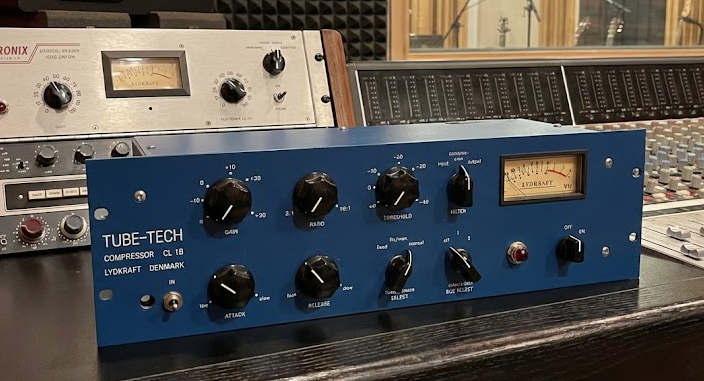
Release controls how quickly the compressor recovers after reducing gain. On the CL1B, fast values (~0.05 s) keep the vocal transparent but can re‑open noise, while slower values (0.3–0.8 s) add glue and sustain.
For this ballad, try 0.25 s so breaths stay natural while phrases bloom. If the mix bus feels pumped, extend to 0.5 s and raise makeup gain 1 dB to compensate.
Optional—set release so it finishes just before the next phrase (roughly 1 beat at 85 BPM ≈ 0.7 s). Use Auto mode if you want a dual-stage curve that adapts to varying dynamics.
Trained on Real Mixing Work
Built on real-world projects, top-tier engineers' workflows, and trusted sources.
Always Current
Stays up to date with modern mixing techniques as the industry evolves.
Actionable Guidance
Delivers clear, step-by-step instructions from vocal mixing to final mastering.
Battle-Tested Presets
Provides downloadable presets tailored to different mixing scenarios.
Digital Pills
Redeem special codes to unlock exclusive downloadable assets—vocal chain presets, mixing templates, plugin promos, and curated content from top engineers. Each pill drops practical tools straight into your workflow.
Included in drops
- 🎤
Vocal Presets
Artist-built chains for different genres
- 🎛️
Mix Templates
Session-ready starting points
- 🎁
Promo Codes
Plugin + gear perks each month
Flexible Interface
Designed to fit your workflow without getting in the way.
Compact Mode
Hide the full interface to a slim bar so your canvas stays clean. Expand back instantly when you need it.
Resizable UI
Toggle between Large and Small layouts depending on your screen space and preference.
Light & Dark
Match bright studios or late-night sessions with a single toggle that syncs across devices.
Web Search Mode
Pull in references, definitions, and mix notes from trusted sources without leaving the chat.
Ready to Transform Your Mixes?
Start getting professional mixing guidance powered by AI.